
Surveillance Technology Has Come A Long Way.
In the early days of CCTV, camera systems required a large investment in time and manpower. They took up a lot of real-estate and an even bigger portion of your overhead costs.
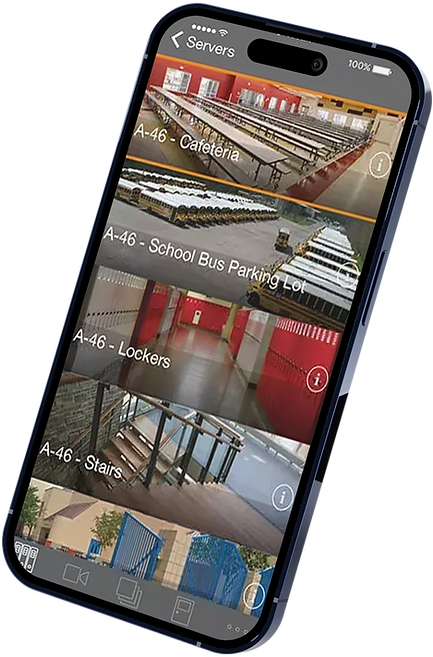
Modern camera systems cost less to operate, setup in a flash and don’t need a dedicated security room. In fact, Video Management Software allows you to monitor camera feeds from anywhere with internet access. There's even a mobile app!
Digital security cameras are smaller, faster and smarter; they include features like night vision, motion detection, scene change detection, automated alerts & more. And with the use of powerful Ai Video Search technology, you can find the image you're looking for in seconds, not hours.


Security
Cameras
Whether you need Indoor/Outdoor, Multisensor, Single View or Pan/Tilt/Zoom cameras, our security experts will guide you through the process of creating a camera system that gives total video coverage without leaving blind spots.
Complete Video Coverage
• Hi-Def 4k Cameras
Clearer images means less time looking over videos to find the video frame you're looking for.
Give your eyes a break and let AI do the hard work of searching for specific key words.
You can monitor cameras from anywhere you have network access; there’s even a mobile app for remote viewing.

Indoor Cameras
Outdoor Cameras
Multi-Sensor Cameras
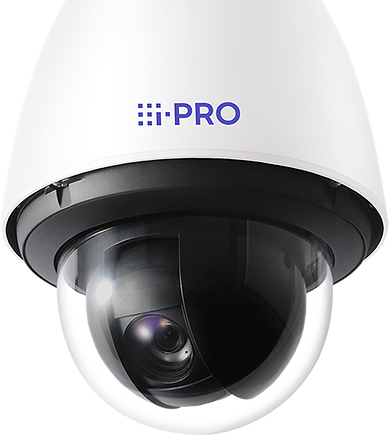
Pan/Tilt/Zoom Cameras


About VMS
Video Management Software is a virtual control center for your camera system. It brings all of your camera views to the forefront, allowing for a complete picture of your building. VMS gives you total control of what camera views are most important to you.
Monitor Video From Anywhere
• Intuitive & User Friendly
Video Monitoring Software allows you to monitor camera views in a way that makes sense to you.
• 5 Cameras or 500 Cameras
Because a VMS isn’t limited by hardware, it boasts unlimited scalability, handling all your cameras & more.
• Customized To Fit You
Plug-in based architecture allows users to customize the functionality of their surveillance system to better suit their specific needs.

Remote Video Monitoring
Gone are the days of being stuck in a video closet watching CCTV. Modern surveillance systems allow you to monitor your security camera feeds from anywhere with network access; there’s even a mobile app!
Ai Video Search
Smart Object Detection
Give your eyes a break and let Ai do the searching for you. Ai powered keyword searches allow you to find what you’re looking for in seconds, quickly identifying people, clothing, objects, transportation and more. Ai can also provide accurate, real-time facial recognition without requiring a costly dedicated server. It can even be used with your existing surveillance system, saving money on costly equipment upgrades.
ElectroMedia: The right choice for your business network
-
Analysis & troubleshooting
-
Future Proof System Design
-
VoIP Cabling
-
Low Voltage Wiring
-
Coax Copper Cable
-
Telephone Cabling
-
LAN & WAN Systems
-
Paging Systems
-
Server Racks
-
Patch Panel Termination
-
Wireless LAN solutions
-
Cat6 & Cat6a
-
Gigabit Cat6a & Coax Ethernet
-
Audio / Video Systems
-
Data Networking
-
CATV & CCTV Systems
-
Security & Access
-
BISCI certified installers
-
TIA/EIA 606 standards followed
-
25 Year Cabling Warranty

John, IT & Systems
"They're our preferred communications provider, and we recommend them without hesitation."
Getting Started Has Never Been Easier
Expert, guided help at every stage of the process.
Step 1: Let's Talk
20 Minute Call
We start by asking the right questions, learning what your goals are & listening to what kind of features you're looking for in a phone system.
Step 2: Inspection
On-Site Visit
A phone call isn't enough to really understand the unique challenges of each site. We thoroughly inspect each job looking for key details.
Step 3: Quoting
30-60 Minute Call
Once we understand what's required, we'll send you a detailed quote, followed by a phone call explaining in detail the next steps.
Step 4: Installation
On-Site Training
Once the quote is approved, our technicians will quickly install and activate your new phone system, training your staff on how to use it.